
Reface for FACEIT
Free · on the Chrome Web Store · no accountFACEIT, upgraded. Reface adds the numbers and the tools FACEIT leaves out, right inside the pages you already use: who you are up against, what to ban, who is smurfing, how much Elo is at stake, and the boring clicks done for you (with a countdown you can always cancel). Everything paid extensions sell, for free.
Everything in one free extension
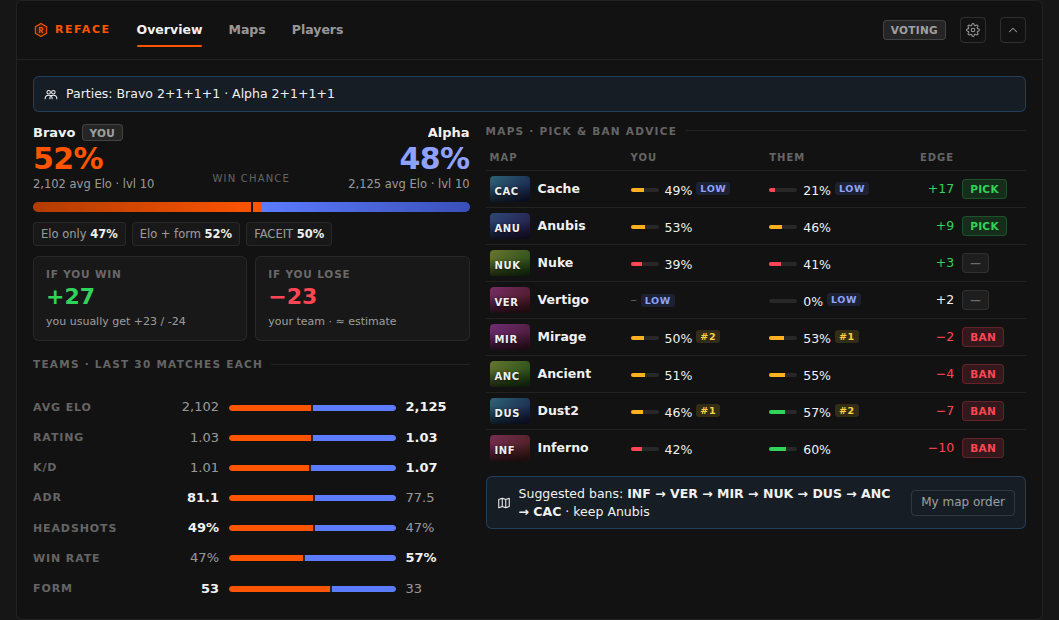
Match room intel
- Win forecast: Elo only, Elo + form, on the map, and FACEIT’s number.
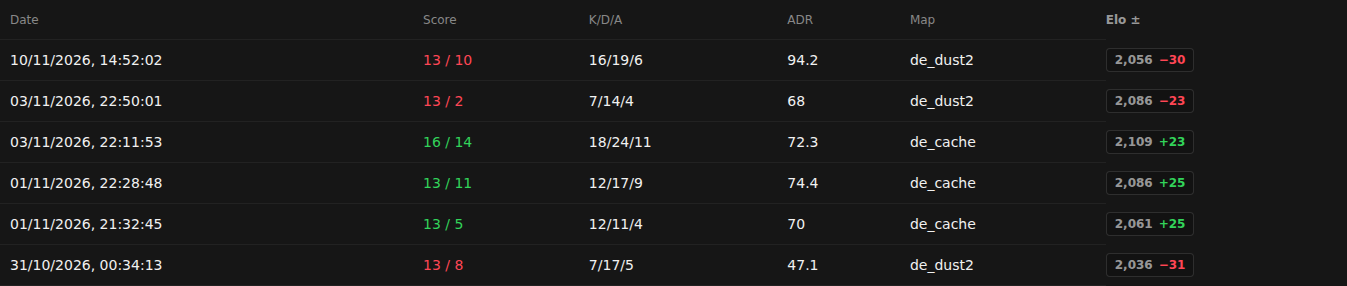
- Elo at stake (+/−) before the match starts, next to your usual gain/loss.
- Team comparison: Elo, rating, K/D, ADR, HS, win rate, form.
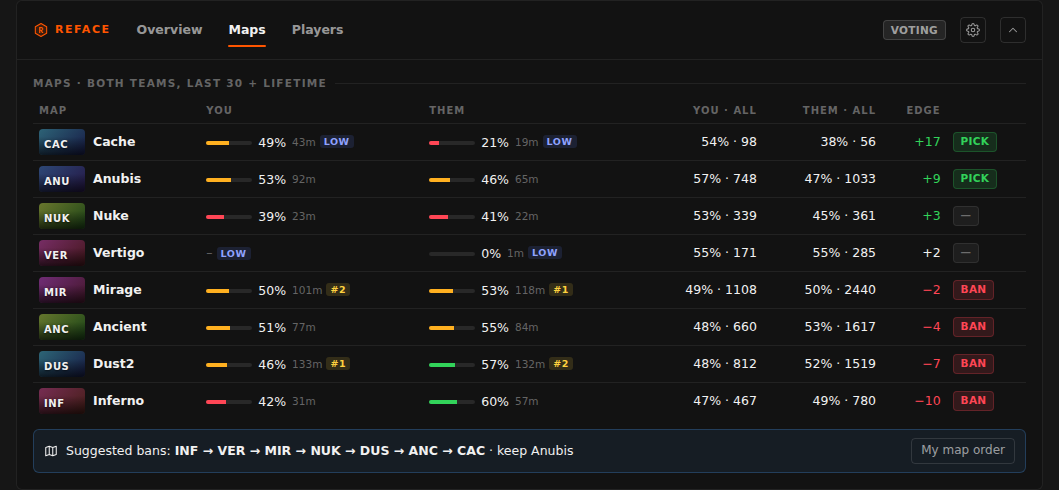
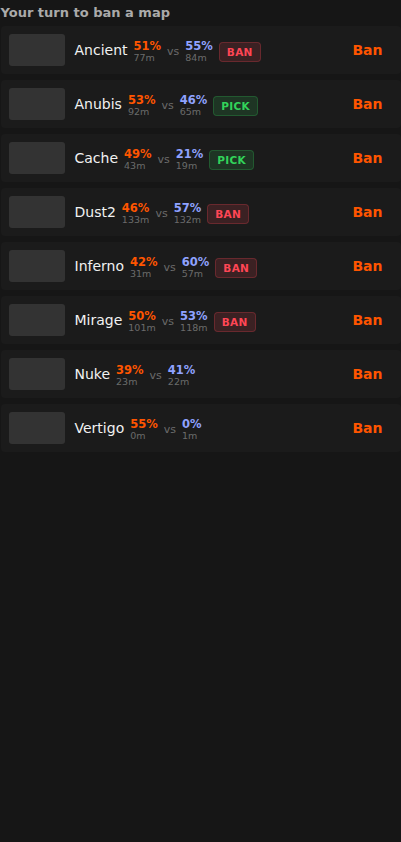
- Map table for both teams (recent + lifetime), most / least played, pick & ban advice and a ban order.
- Parties with their size, smurf, ban and tagged-player alerts.
- A sortable 10-player table and a richer scoreboard (rating, entries, clutches, flash assists, utility, AWP, multi-kills, Elo per player).
Every player decoded
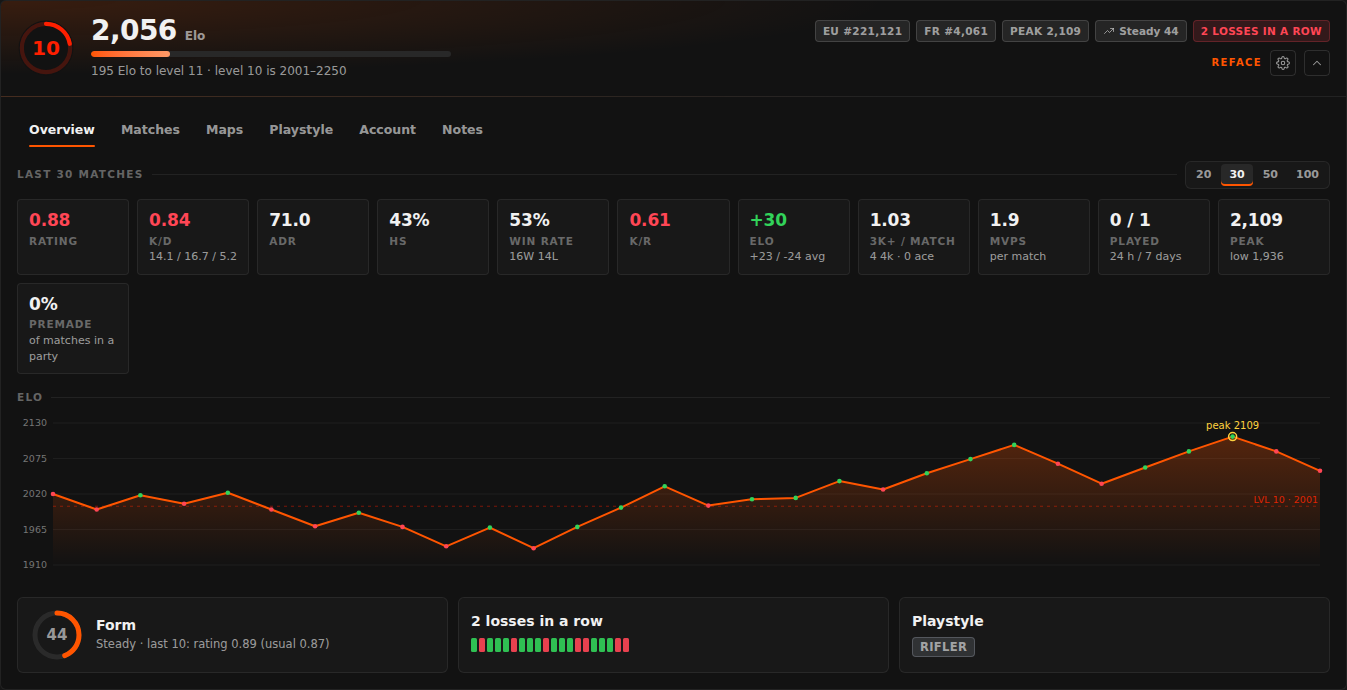
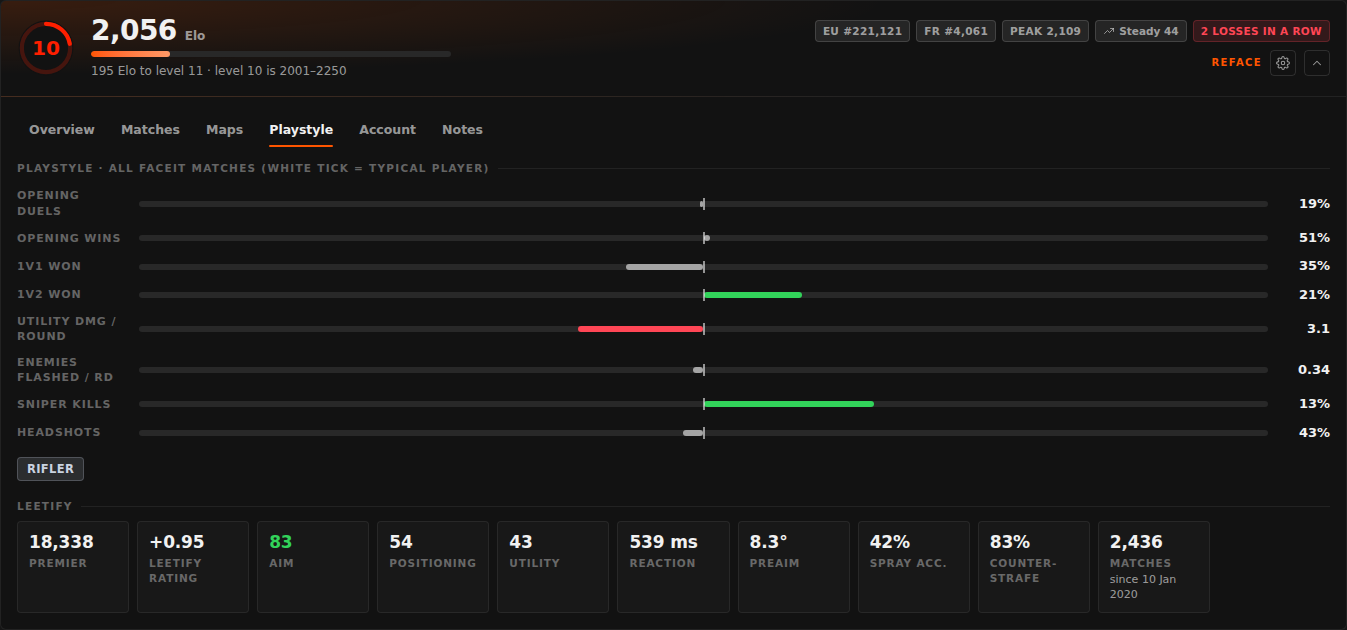
- A line under each FACEIT player row: level 11–20, role (AWP, entry, support, clutch, rifler), form, watch out / weak link (both teams), smurf check, bans, streak, Premier rating, played-before, your tags.
- One click opens the full breakdown: last 20/30/50/100, Elo graph, maps, playstyle vs a typical player, Leetify aim/positioning/utility/reaction, Steam & FACEIT account checks, notes.
- Played before: everyone you met in your last 50–300 matches, with or against you, and how it went.
Automation you can cancel
- Accept matches (optionally only when FACEIT is in the background), with a countdown.
- Accept party invites: everyone, friends only, or your list.
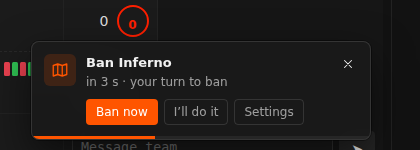
- Veto maps (your order, data, or both) and servers (your order, then ping).
- Copy the connect command, connect to the server, call your position per map in team chat.
- Desktop alert, sound and tab flash when a match is found or the server is ready.
Elo & levels
- Levels 11 to 20 (one every 250 Elo past 2250), on FACEIT’s own cards too.
- Elo after every match and the change in match lists, level-up markers.
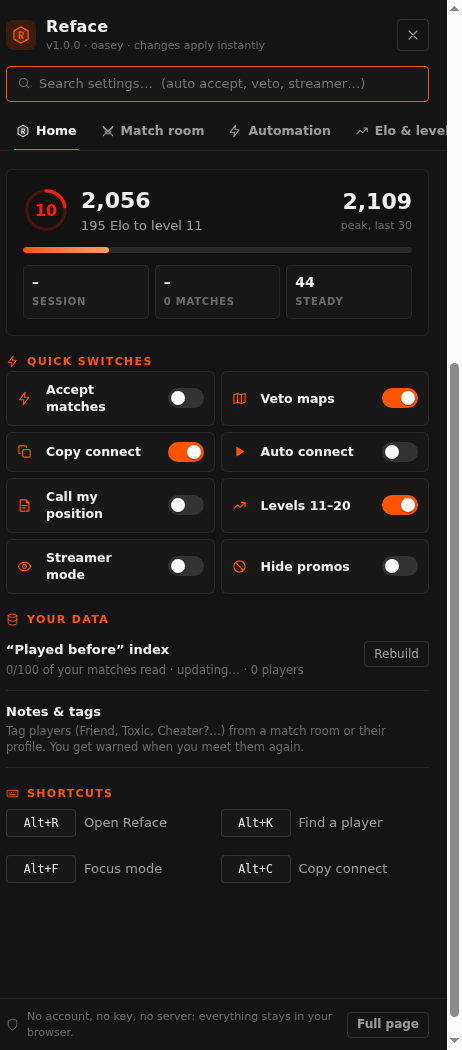
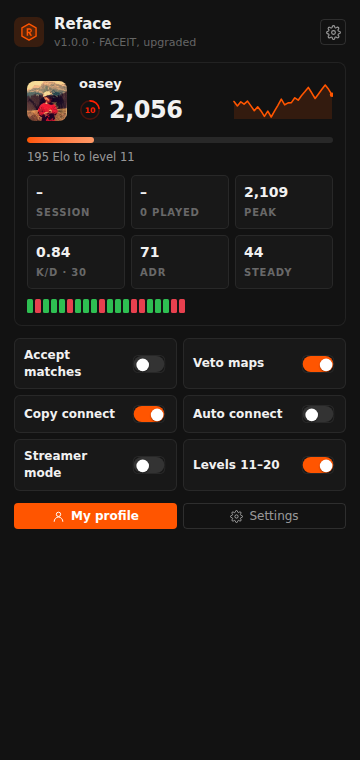
- Sidebar widget: level ring, session ±, ranks; toolbar badge with your session Elo.
- Sessions, an Elo goal with “≈ matches at your pace”, peak, history page, level-up celebration.
- Level & Elo next to player links everywhere (friends, party, search…).
Your FACEIT, your way
- Every setting from the FACEIT page itself: the Reface item in FACEIT’s menu, or
Alt+R. - Focus mode (manual, during veto/connect, or always), streamer mode, hide promos.
- Accent colour, compact layout, your own shortcuts, find any player with
Alt+K. - Private tags and notes (Friend, Toxic, Cheater?…) with a warning when you meet them again.
Private by design
- No account, no API key, no Reface server.
- Reads FACEIT’s public data, Leetify and Steam straight from your browser.
- Notes, history and settings stay on your computer (export / import a backup any time).
- Only runs on faceit.com.
Compared
| Reface | EloStack free | EloStack+ | Repeek | |
|---|---|---|---|---|
| Price | Free | Free | Paid | Free |
| Player stats in the room | ✓ last 20/30/50/100 | ✓ | ✓ | ✓ last 30 |
| Win forecast & Elo at stake | ✓ 3 models + FACEIT’s | ✓ | ✓ | Elo ± |
| Map stats, pick/ban advice | ✓ + ban order | ✓ | ✓ | Matches per map |
| Watch out / weak link | ✓ both teams | Your team | ✓ both | – |
| Smurf check | ✓ with reasons (account, Steam, Leetify) | – | ✓ | – |
| Roles, form, played before | ✓ | ✓ | ✓ | Encounters |
| Levels 11–20 | ✓ | ✓ | ✓ | – |
| Auto accept / party invites | ✓ / ✓ (friends, list) | ✓ / – | ✓ / – | ✓ / ✓ |
| Auto veto maps / servers | ✓ / ✓ | – | – | ✓ / ✓ |
| Copy connect, auto connect, call position | ✓ ✓ ✓ | – – ✓ | – – ✓ | ✓ ✓ – |
| Focus mode, streamer mode | ✓ ✓ | – – | – – | ✓ – |
| Notes, goal, session report | ✓ ✓ ✓ | – – – | ✓ ✓ ✓ | – – – |
| Leetify, Steam, ban checks | ✓ | – | – | FACEIT bans |
| Settings on the FACEIT page | ✓ full | Popup | Popup | ✓ |
| Account or key needed | No | FACEIT sign-in | FACEIT sign-in | No |
Install (one click)
From the Chrome Web Store
- Open Reface on the Chrome Web Store and click Add to Chrome. It updates itself from then on.
- Edge, Brave, Opera: the same page works. Edge asks once to Allow extensions from other stores.
- Pin Reface from the puzzle-piece menu, then open FACEIT.
Without the store: download the zip, unzip it where it can stay, switch on Developer mode in chrome://extensions and click Load unpacked on the folder with manifest.json. Updates are then by hand.
Then
- Reface finds your FACEIT account from the page: nothing to sign in to.
- Open a match room or any profile. The Reface item in FACEIT’s left menu (or
Alt+R) opens every setting. - Automations are off until you switch them on (copy connect is on).
- Updates come through the Chrome Web Store by themselves. With the zip: download the new one, replace the folder, click the reload arrow on Reface in
chrome://extensions.
Reface is not made by, endorsed by or affiliated with FACEIT. It only reads what FACEIT already shows you and clicks the buttons you could click yourself. No server, no account, no tracking: privacy policy.